
Student records
Keep student information organised throughout their studies.
Maintain a clear record for each student, from registration through completion. Help authorised staff find the information they need without searching through separate spreadsheets and paper files.
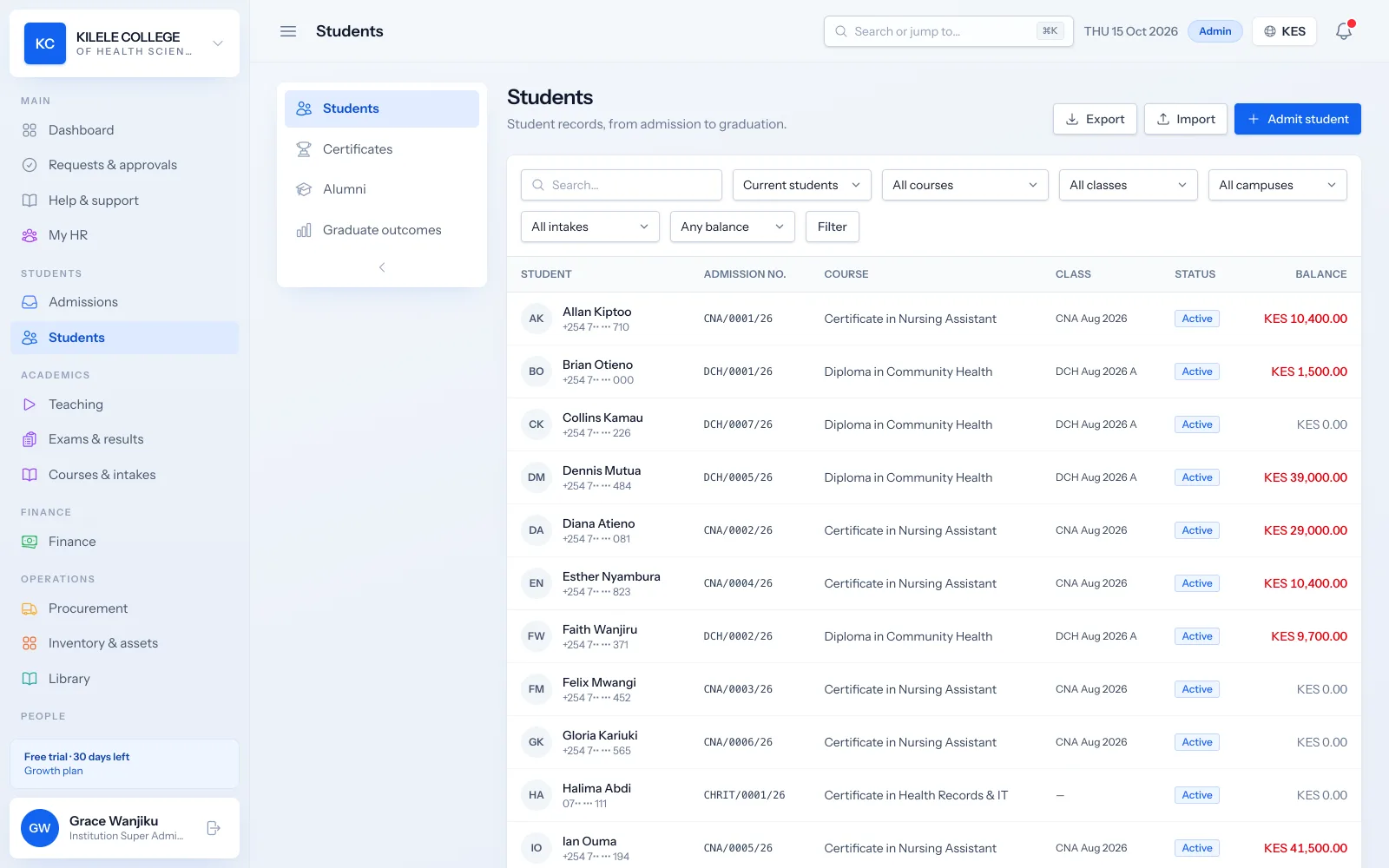
One record everyone shares
Registry, finance and lecturers work from the same profile, so details agree across departments.
Find any student quickly
Search by name, admission number or phone, and filter by course, class, campus, intake, status or balance.
Bring your records across
Import existing students and opening balances from Excel or CSV.
Student records
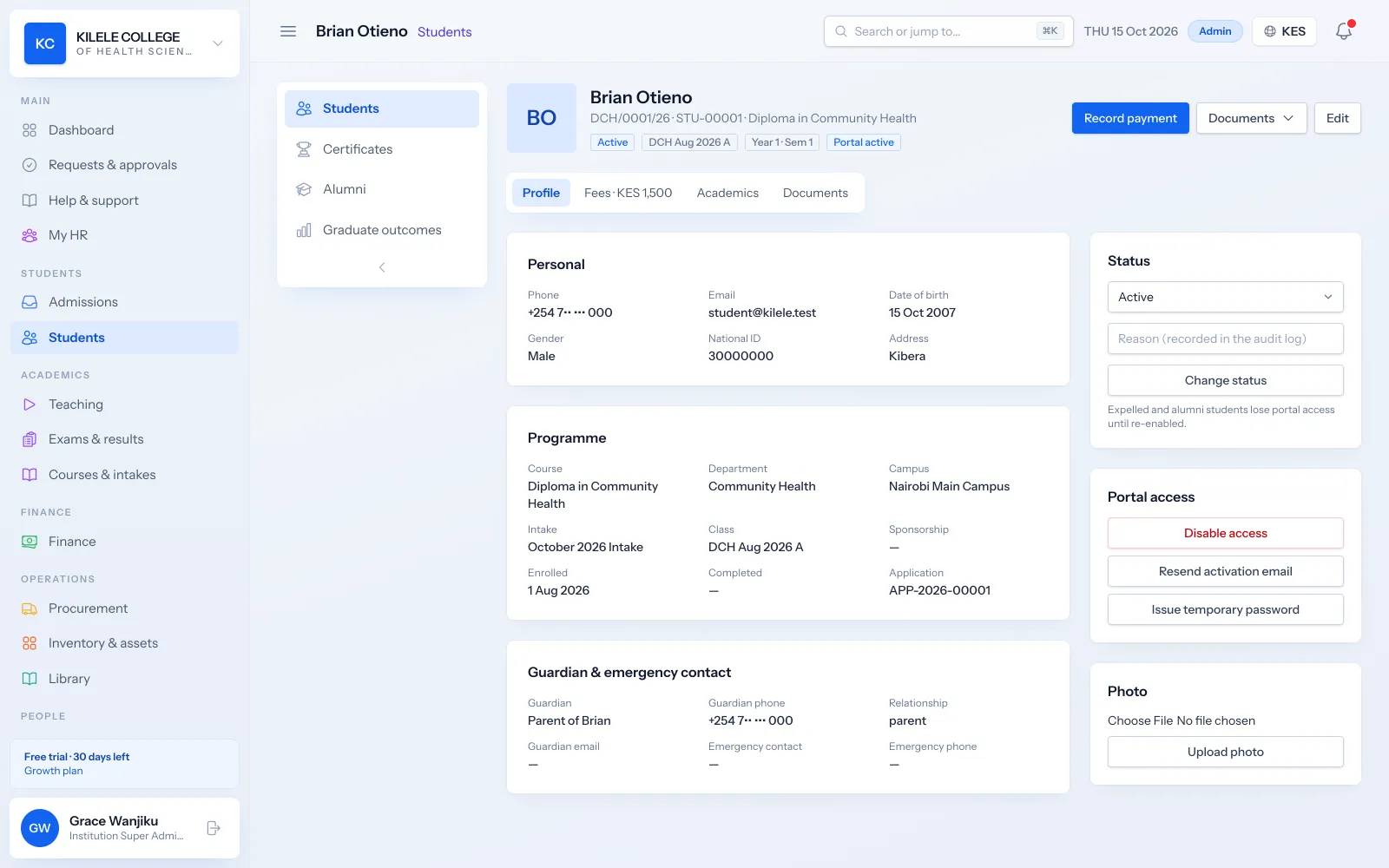
Student profiles and identification
Each student has one profile with their personal details, photo and contacts, identified by an admission number and student number.
- Names, date of birth, gender and national ID number
- Phone, email and address
- Parent or guardian and emergency contacts
- Photo, printable student ID card and portal access status
Student records
Programme and intake details
The profile shows what the student is studying and where: course, campus, intake, class, year of study and semester, with sponsorship details.
- Course, campus and intake
- Class, year of study and semester
- Sponsorship information
- Enrolment and completion dates
Student records
Uploaded documents
Documents uploaded with the application move to the student record, and staff can add more later.
- National ID or passport, academic certificates, passport photo, birth certificate and medical form
- Documents opened from the profile by authorised staff
- Students can see their own documents in the portal
Student records
Academic history
Attendance, marks, results, competency records and certificates build up on the profile as the student progresses, alongside invoices and payments.
- Attendance percentage per unit
- Published results and transcripts
- Competency progress for CBET programmes
- Fee statement with invoices, payments and balance
Student records
Enrolment status
Students do not always move in a straight line. Status changes are recorded with the date and appear in reports.
- Statuses: active, deferred, suspended, withdrawn, completed, graduated, expelled and alumni
- Deferment requests submitted by students through the portal and approved by the registrar
- Portal access that can be switched off for an individual student
- Alumni records with employment details after graduation
Student records
Record updates and access permissions
Who can view or change student records follows their role. Every important change is recorded with who made it and when.
- Role-based permissions to view and to manage students
- Campus-level access for campus administrators
- Audit log of changes
- Excel and CSV import with a preview, and export of the student list
How it works
Student records, step by step
-
1
Create
Students are created on admission, or imported from your spreadsheets.
-
2
Place
Assign the student to a class and intake; timetable and fees follow.
-
3
Maintain
Staff update details as needed; changes are logged.
-
4
Complete
Completion and graduation are recorded and the student becomes alumni.
Who uses it
Built for everyone involved
Registrars
Create and update student records and issue documents.
Finance officers
See fees and balances on the same record.
Lecturers
See the students in their classes.
Students
See their own record in the student portal.
FAQ
Questions about Student records
Which information appears on a student profile?
Personal details and photo, national ID number, contacts, guardian and emergency contacts, course, campus, intake, class, year and semester, sponsorship, status, documents, attendance, results, invoices, payments and certificates.
How are existing records imported?
Use the import wizard with an Excel (XLSX) or CSV file. You map your columns to Soma360's fields, preview the result and fix any rows it flags before anything is saved. Courses, staff, opening fee balances and past payments can be imported the same way.
Who has permission to update records?
Staff whose role includes managing students, such as registrars and institution administrators. Roles and their permissions can be adjusted per institution, and every change is recorded in the audit log.
How are deferred and withdrawn students recorded?
By changing the student's status to deferred or withdrawn. Students can also request deferment through the portal, and the request goes through an approval workflow before the status changes.
Works together with
Related features
Admissions management
Online applications, documents, review, admission decisions and enrolment.
Learn moreStudent portal
Profile, fee statements, results, announcements, downloads and requests.
Learn moreExaminations & results
Assessments, marks entry, grading, moderation, approval and transcripts.
Learn moreSee how Soma360 fits your institution
Tell us how your institution works and we will focus the demo on your records, departments and workflows. Prefer to explore alone? Start a 30-day free trial.